Main Window
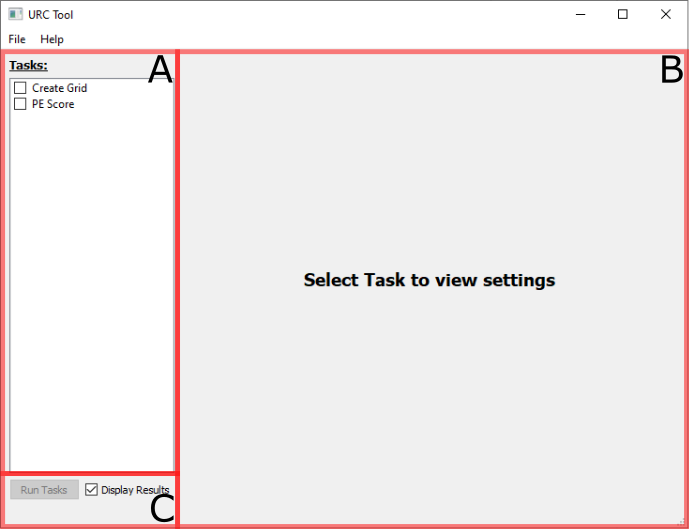
When the tool is first launched the above panel is displayed. The main view can be broken down into three sections:
A. Task list: This is the list of operations to be carried out when the Run Tasks button is clicked. Only checked tasks will be executed, in sequence.
B. Pane View: This section displays the settings for the selected task in the adjacent Task List. Each task and its configurations will be discussed in more detail in the subsequent sections.
C. Run Options: The Run Tasks button will execute all checked tasks when clicked; the button will be disabled if no tasks are checked. The Display Results checkbox indicates if the results will be displayed in a preview window when the tasks conclude; see the results section for more details.
This tool is divided up into several tasks. Presently the following tasks are available:
Create Grid - Converts geologic domain vector layers into index rasters to feed the PE Score task.
PE Score - Calculate the likelihood of the presence, or Potential Enrichment (PE), of Rare-Earth Elements and Critical Minerals based on Data Available (DA) and Data Supporting (DS) resources evaluated per the DA/DS steps of the URC assessment method.