Create Grid Task
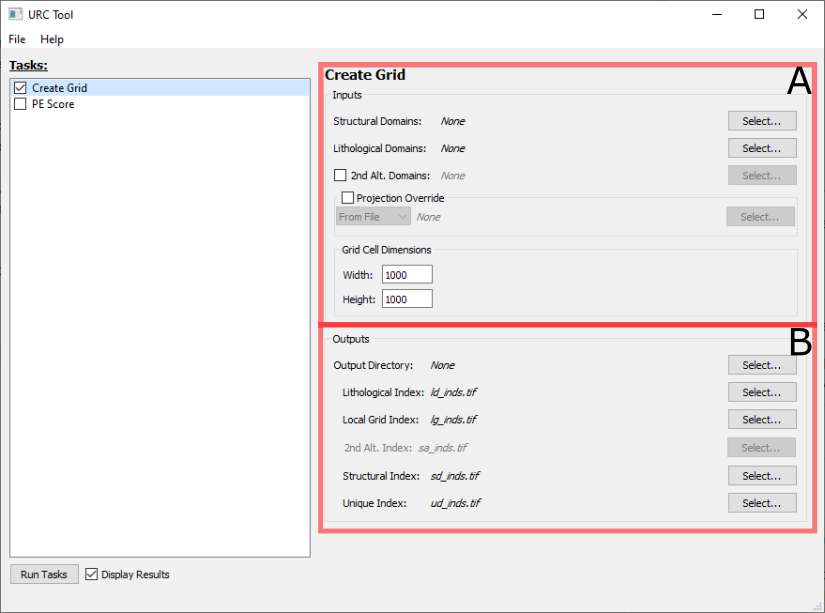
The Create Grid task panel is broken down into two sections Inputs (A) and Outputs (B)
A. Inputs
The following fields are paths to vector *.shp files containing polygons ideally derived using the STA Method as outlined in Rose et al. [2020]:
Structural Domains: A polygon layer representing structural domains. Required.
Lithological Domains: A polygon layer representing lithological domains. Required.
2nd Alt. Domains: A polygon layer representing secondary alteration domains. This is optional, and only included if the box to the left of the prompt is checked.
By default, the output layers will use the projection/coordinate system of the Structural Domains layer. This can be overriden by checking the Projection Override box and doing one of the following:
Select From File from the dropdown menu and selecting a
*.prjfile with the desired projection.Select From EPSG from the dropdown menu and entering a valid EPSG code.
The Grid Cell Dimensions box contain the final two input fields (Width and Height) which define the dimensions of an individual grid cell (pixel). The units for this value correspond to the projection/coordinate system to be applied to the result files as described above. Note smaller grid cell dimensions will potentially increase processing time.
B. Outputs
The output files are rasters *.tif (GeoTIFF) which represent gridded data as a result of processing. This data can be processed
independently, or used as inputs for the PE Score Task.
By default, the Output Directory specifies where all the output files should go. Individual file locations and names can be overridden using the Select… button to the right of the respective file.
The following files are produced as the part of the Create Grid Task:
Lithological Index: The raster-based index grid derived from the input Lithological Domains.
Local Grid Index: The unique identifier for each grid cell.
2nd Alt. Index: The raster-based index grid derived from the input 2nd Alt. Domains. This field is only enabled if the 2nd Alt. Domains: is checked in Inputs
Structural Index: The raster-based index grid derived from the input Structural Domains.
Unique Index: The Id derived by combining Lithological, Structural, and 2nd Alt. (if active) raster indices.
Upon completion of this window, the user may select Run Tasks on the main window to initiate the Create Grid task. An Executing tasks window opens upon selecting Run Tasks that logs execution progress and errors. Note: PE Score can be completed prior to running tasks and both Create Grid and PE Score will be executed sequentially.